RSS

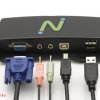
NComputing M300


1: USB Extension A/B
2: Direct Connect Port (RJ45)
3: Reset
4: Power Connector
5: Ethernet RJ45 Port
6: Video Out
7: USB Keyboard and Mouse
8: USB 2.0 Peripheral Port
9: Audio Out and Microphone Port

Key Benefits

  • Up to 45 users per host – Fewer PCs to manage equals lower computing costs per user.
  • Ethernet Connect – Classrooms, labs or offices can connect at greater distances through the local LAN.
  • Numo 2 SoC – Provides PC-quality full screen video streaming.
  • USB Support – Each device includes one USB 2.0 for peripheral support and two USB ports for mouse and keyboard.
  • vSpace Server Software – Simple to install, easy to configure, no complicated hypervisors to manage and no expensive annual licenses to buy.
  • vSpace Management Console – Client devices are easily configured through a remote console.
 
Tinggalkan komentar

Ditulis oleh pada 7 Maret 2012 inci Uncategorized


The Industry’s First 3-in-1 Thin Client: The NComputing M300

The Industry’s First 3-in-1 Thin Client:  The NComputing M300

NComputing has announced the M300, an entirely new virtual desktop device that redefines what is possible in a thin client. The M300 delivers customers a 3-in-1 device that provides a rich PC experience to 3 users simultaneously at 1/3rd the cost of PCs and other thin clients as well as dramatically lower power and networking infrastructure. The M300 enables customers to deploy more computing per budget dollar, spend less on power and facility upgrades, and manage more efficiently with fewer IT resources.

Available immediately in APAC, the M300 is targeted at local workgroups from 3 to 45 virtual desktop users in environments like classrooms, labs, libraries, shared office workspaces, business centers, and call centers.

Said David Smith, Director of Technology, Oakland School for the Arts, “I like that the M300 can be used in environments where you only have 1 LAN port and power switch. There is nothing like it on the market. More bang for your buck”.

Watch the webinar on demand and hear directly from David Smith as he shares his experience with deploying the M300 in academic classrooms throughout OSA.  Watch now.

Read on for additional details of the new M300 and links to learn more…

Key Features:

  • Each M300 kit has three (3) client devices but only requires a single power plug and network connection.
  • Includes next generation multi-tenant Numo2 SoC for enhanced multimedia and full-screen HD video playback.
  • Video resolution to 1440 x 900 at 24 bits.
  • Share one host PC with up to 45 M300 users with included vSpace Server desktop virtualization software.
  • Energy-efficient (typically 2 watts per user).

Device Requirements: The M300 can be used to connect to Windows Server 2008 R2 SP1 or Windows MultiPoint Server 2011 for multi-user applications and M300 stations can also individually connect to Windows 7 SP1 (32 or 64 bit) for single-user applications such as 1:1 VDI and digital display systems.  Support for Linux will be available in Q2.

vSpace Server Requirements:  NComputing has released vSpace 6.6 Server virtualization software for the new M300 kit. This release enables vSpace’s many outstanding features for the M300 and is “required” for any new M300 deployment. vSpace 6.6 also features a common installer for both the L-series and M-series products; therefore it is also the latest update for the L-series product line.

Note:  The 6.6 update is not required for existing L-series installations but it is advised as it includes both vSpace Server and L300 firmware enhancements.

Learn more:

Read the press release.

Visit the NComputing Product Page for M300 supporting materials.

 
Tinggalkan komentar

Ditulis oleh pada 6 Maret 2012 inci Uncategorized


NComputing FOR LINUX ON UBUNTU 8.0.4

Ubuntu Supplement to X350 & X550 User’s Guide
NComputing X350 & X550 vSpace Software
for Linux on Ubuntu 8.04

Installing Ubuntu 8.04
You can locate and download Ubuntu 8.04 (LTS) from: http://old-releases.ubuntu.com/releases/hardy.

Please use only a clean image from one of the Ubuntu ftp sites as vSpace is designed to work with
the kernel, desktop and packages that are included in the LTS version.

1. Download Desktop Edition; Ubuntu 8.04 LTS install CD image
2. Create Ubuntu 8.04 System CD-R
3. Insert Ubuntu 8.04 Disk into System and Power-on/boot the system 4. Ubuntu Install screen opens with option(s) for running the installation program andalso has function key selectible setting at the bottom of the screen

  • Press F4 (function key 4) to access Modes
  • Then Select: “Safe graphics mode“ (Insures base host video card is correctly   identified)

5. Use keyboard arrow keys to highlight “Install Ubuntu“ and press Enter
6. At the appropriate install screens, Select

  • Language
  • Time Zone Setting
  • Keyboard Layout Setting (select appropriate Country)
  • Disk Preparation: Select “Guided Option; Use Entire Disk“
  • System Administrator Set-up: Enter “User Name“ and “Password“ Information

7. Ready to Install: Press Enter to Proceed
8. Installation Completes
9. Now Restart/Reboot System
10. After the system reboot, the Ubuntu Desktop should come up and present Username login prompts
11. Log into the system with appropriate “username and password.” The “User” must have
system “administrative rights” to continue the installation; however, the Username and
password supplied during the system’s initial Ubuntu 8.04 install are recognized to have
administrative rights. (note that your Ubuntu 8.04 installation should have 2.6.24-23- (or 24)
generic kernel installed)

********* Even if prompted following this login, DO NOT INSTALL Ubuntu UPDATES *********
12. Now, copy the X550 Ubuntu 8.04 NComputing vSpace installation file to the desktop.
xseries_3.0.1479-2_i386.deb ( or the most recent version of vSpace for Ubuntu )

http://networkmonitor.lge.com/us/downloads/software/Ubuntu_8_04_X350&X550_UserGuide_Supl_v1479-2_rev_2.pdf

 
Tinggalkan komentar

Ditulis oleh pada 20 Februari 2012 inci Uncategorized


Pemakai NComputing

 
Tinggalkan komentar

Ditulis oleh pada 8 Februari 2012 inci Uncategorized


LETTER FROM THE CEO

Happy New Year

As we kick off 2012, I would like to thank our customers and partners worldwide for their partnership and business last year. The new year ahead is very promising — we have exciting and innovative offerings in store for you and later in this letter I will share my thoughts on what to expect from NComputing in 2012.

First, let’s take a quick look back at 2011. It was a year full of historic change, financial challenges as well as economic instability around the world. Organizations worldwide faced growing global competition, budget pressures and a need to do more with less. IT projects with questionable business impact were put on hold. Select projects offering immediate Return On Investment (ROI) became a high priority. Under these challenging circumstances, an even larger number of organizations turned to NComputing’s VDI solutions to solve their computing needs. In doing so, these customers gained both immediate savings (up to 75%) and ongoing management savings (up to 75%), all while managing their growing computing deployments with their current IT resources. We have 20 customer stories and case studies from 2011 that describe how IT administrators in education, healthcare and small to midsize businesses saved money and time with our solutions

Company Highlights for 2011:

  • NComputing exceeded 3 Million seats deployed worldwide, making it one of the fastest growing desktop virtualization companies
  • IDC ranked NComputing as #1 Market Share Leader in Asia Pacific, India and Latin America, and #2 or #3 worldwide
  • Multiple organizations deployed our solutions at scale — ranging from 5000 seats to more than 50,000 seats
  • vSpace Server 6.5 released in September, once again changed the VDI economics by being able to scale user densities up to 100 users per physical server while delivering a rich user experience. Try our new solution now
  • Expanded vSpace Server support for the latest Microsoft operating systems including Windows Multipoint Server (WMS) 2011 and Windows Server 2008 R2 SP1 for multi-user and Windows 7 for 1:1 VDI
  • Strengthened alliance partnership with Microsoft in Latin America and Asia Pacific regions with many joint wins
  • New partnership announcement with Citrix to deliver an NComputing HDX Ready System-on-Chip based thin client for enterprise customers. Learn more

So, in a tough and turbulent year that was 2011, we grew our company and emerged stronger.

What To Expect in 2012

We are in the midst of a computing revolution. For many decades, the only choice for computing was the desktop PC and yes, you had to be at your desk to use it. There are so many device choices available today. In 2011, tablets caught the imagination of tens of millions of users. Netbooks fell from grace due to their lack of performance and 2 year refresh requirements. Ultrabooks are around the corner in 2012. With so many choices, users want to pick their own device creating the need for IT administrators to support BYOD ( Bring Your Own Device). We don’t believe that the PC or computing is dead. On the contrary we believe NComputing will continue to enable millions of new users to get access to computing in the future. What will be different is helping IT deliver a rich user experience to any device, as well as deliver any app — whether based on Windows or other operating systems.

In 2012, we will continue to focus on what makes NComputing hardware and software products unique: Simple, Powerful and Most Affordable desktop virtualization solution in the world. Here are some of the areas of product and service innovation you will see from the NComputing team through the year:

  • Yes to BYOD, mobility and re-use of existing PCs. Tablets, notebooks, and smartphones will be able to connect to a vSpace Server via a software client. Our vSpace Client for Windows is already in beta. Click here to participate. We are planning support for additional platforms.
  • Simplified and scalable management for mid- to large-sized deployments
  • The next generation of our NumoTM System-on-Chip powering advanced thin clients that will change your beliefs about what you can expect from a thin client
  • Improved technical support platform, online community and tools that make it easy to get your technical questions answered quickly and accurately
  • New thin client that provides native support for Citrix HDX for enterprise customers and partners.

I am thrilled about the new offerings we have in store for you and I look forward to an exciting new year.

Wishing you the best

Raj Dhingra
CEO NComputing

 
Tinggalkan komentar

Ditulis oleh pada 26 Januari 2012 inci Uncategorized


Green NComputing

Eco-Friendly Computing

We can’t live without PCs, but we need to learn how to live with them: they consume too much electricity and generate too much e-waste. A typical PC takes 110 watts to run, and there are almost a billion of them on the planet. And according to the Silicon Valley Toxics Commission, e-waste is the fastest growing part of the waste stream.

The solution is simple

Today’s PCs are so powerful that we no longer need one for each person. We can tap into the excess power in one PC and share it with many users. NComputing technology uses just 1 to 5 watts, lasts for a decade, and generates just a few ounces of e-waste.

Save on computer costs & electricity

NComputing systems save you 75% on hardware, and since they draw less than 5 watts, you reduce your energy footprint by as much as 90% per user. And because NComputing devices produce practically no heat, they reduce the need for energy-consuming air conditioning. Electricity savings alone can pay for the NComputing virtual desktops in as little as one year. No wonder NComputing has won so many green awards.

Leading the way

The kids in Lindsay Park are working in Canada’s first carbon-neutral computer lab.

Judson ISD’s wide-ranging green initiative includes the NComputing X-series. Their detailed presentation has valuable information that you can present to your district.

Save even more with energy rebates & discounts

Electrical utilities are offering incentives such as purchase rebates and lower electricity rates for using NComputing. Click here to learn about rebates.

“CO2 emissions were reduced by 3.5 tons per year in just one lab.”

 
Tinggalkan komentar

Ditulis oleh pada 23 Januari 2012 inci Uncategorized


Microsoft Operationg System License With NComputing System

Multiple Users on a Single OS Requires Microsoft Windows Server Licensing

For applications where multiple interactive users are simultaneously sharing a single operating system, standard Microsoft Windows Server licensing applies. This means that the shared host computer (or virtual machine) runs a Microsoft Windows Server operating system.

In addition a Microsoft Windows Server Client Access License (WS CAL) and a Microsoft Remote Desktop Services Client Access License (RDS CAL – formerly known as a Microsoft Terminal Services Client Access License or TS CAL) are required for each end-user or device that accesses Windows Server.

Also, Microsoft’s new Windows Multipoint Server 2011 can be used and requires a Windows MultiPoint Server 2011 CAL (WMS CAL) for each access device (and for the host computer if the host computer is used as a user station).* The diagram at right shows an example configuration with five users sharing a single computer running Windows MultiPoint Server 2011.

For further details on Microsoft’s multi-user licensing please refer to Microsoft’s website and licensing brief titled: “Licensing Windows Client Operating Systems in Multiuser Scenarios.”

Use Model Example Configuration Applicable
NComputing
Product
Supported OSes **
Multi-user Single OS
Multiple simultaneous interactive users sharing a single operating system
See diagram U-series
X-series
L-series
Windows Server 2003 R2
Windows Server 2008
Windows Multipoint Server 2011
* Note that under Microsoft Volume Licensing Academic Programs, Windows MultiPoint Server 2011 Academic is required on the host computer and both a Windows Server CAL and WMS CAL are required for each user station.** Refer to the Knowledge Base for current OS support information.
 
Tinggalkan komentar

Ditulis oleh pada 23 Januari 2012 inci Uncategorized


VSpace Server

 
Tinggalkan komentar

Ditulis oleh pada 19 Januari 2012 inci Uncategorized


SDI BINAKHEIR DEPOK

SDI BINAKHEIR, Yang menggabung kurikulum Nasional dan International, juga telah menggunakan Teknologi Ncomputing sebagai fasilitas Lab.Komputer di sekolahnya.Pertanggal 3 November 2011 Lab.Komputer yang tadinya menggunakan komputer standard, sekarang telah di ganti dengan teknologi NComputing.

Dan ini sangat membantu yayasan Binakheir dalam pemakaian listrik, yang selama ini sangat menggangu dalam pemakaian listri.

 
Tinggalkan komentar

Ditulis oleh pada 5 Januari 2012 inci Uncategorized


SMP, SMA BUDI WALUYO, Cisanggiri Jakarta Selatan

SMP & SMA BUDI WALUYO

SMP & SMA Budi Waluyo, Juga telah menggunakan teknologi Ncomputing sebagai Lab Komputer, hadirnya Ncomputing di Sekolah Budi Waluyo sangat membantu dalam penghematan biaya listri, dan biaya perawatan komputer. Solusi NComputing berdampak Positif bagi Yayasan Budi Waluyo.


2 Komentar

Ditulis oleh pada 1 November 2011 inci Uncategorized


Tag:

 
Rancang situs seperti ini dengan WordPress.com
Mulai